Welcome to the BIROW 5 Workshop Abstract Submission System |
Abstract submission for the BIROW 5 Workshop is a 100% web based
process.
In order to complete a SUCCESSFUL SUBMISSION,
understanding how the system works, what the requirements are, and what
information is needed will streamline the process for you.
So prior to beginning the abstract submission process, please
take a few minutes to review the information listed below. With a general
understanding, your submission should be successful.
ABSTRACT DEADLINE DATE:
now EXTENDED...
DECEMBER 19 (3:00 pm EST)

|
| Presentation Mode Defined |
| All accepted abstracts for the BIROW 5 Workshop will be assigned
as |
| Standard Poster Presentation
|
• 4 x 4 hardcopy poster display
only.
Standard Posters must be displayed for the entire meeting to allow attendees
the opportunity to review the material. The scientific poster display
will consist of a (4 x 4) poster. The Standard Poster display may be a
presentation of twelve 8.5 x 11" pages posted in the space provided.
Pushpins will be provided, but authors may wish to use Velcro strips for
mounting poster elements. (Use the hooked side of the Velcro strips on
the back of your poster).
If selected for a Standard Poster Presentation, the presenting author will be expected to be available to discuss the
poster during a specified time.
Note: The individual names of contributing authors MUST appear on all
posted presentations. |
Abstract Submission for the BIROW 5 Workshop is a 100% web based process:
- You will complete information about an Abstract and the contributing authors.
- Then upload the 500 word Abstract document.
- In support of our policy of blind review, please do not put any author names
or institutions anywhere in the Abstract document.
- In addition, the Abstract document should not contain a title, graphs, figures,
tables, images or multimedia elements.
- Scientific
Abstracts submissions should be original work, and
should NOT have been presented
at any other national or international conference held in the United States
or Canada, UNLESS specific permission
has been granted by the Scientific Program Directors.
- The Program Committee reserves the right to reject Abstracts.
- Authors who submit Abstracts that are accepted should understand that they
will be required to pay the regular registration fees for the conference that
all attendees are required to pay.
You should review the Abstract
Formatting Guidelines prior to preparing your submissions.
(back to Overview)
| Prior
to being permitted to upload your Abstract |
You will need:
- Each Author's first and last name, and email address.
- Each Author's Institution Name, City, State/Province/Country.
- To determine the Subject Category most relevant to your submission.
- To prepare an abstract with a maximum of 500words, containing text,
formulas and symbols (created using the "Symbol" font only), composed
in Microsoft Word, Corel WordPerfect or ASCII Text. There is to be no title
or author information, and no graphs, figures, tables, images or multimedia
elements in this document. For details on including formulas, see Document
Upload/Rules below. Abstracts that exceed 500 words will
be rejected. Abstracts containing graphs, figures, tables or images will
be rejected.
- If applicable, include a statement within your Abstract disclosing any "Conflict
of Interest" that may exist.
| Abstract
Formatting Guidelines |
Adhere to the following when preparing
your Abstract file. The file will be uploaded to the abstract system once you
have gone through the submission process:
- Abstracts should be composed in Microsoft Word, Corel Wordperfect
or ASCII Text.
- Abstracts submissions are to ONLY contain text, formulas and symbols
- DO NOT include Title, Author names/institutions, graphs, figures,
tables, images or multimedia elements.
- Abstracts must not exceed 500 words.
- Use 8 point, Times Roman Font for the text.
- Use 8 point, Symbol Font for symbols.
- If embedding formulas, keep the text size at 8 point.
- Use full justification in the document; do not place hard returns
in document.
- Do not use 'headers' or 'footers'.
- Add a conflict of interest statement if applicable.
You should review the Sample
Abstract prior to preparing your submissions.
(back to Overview)
| ACCESSING
THE SUBMISSION SYSTEM |
Once
you have accessed the system site, in order to access the submission system,
you'll be prompted to login using an Abstract Submission Username and Password.
- If you have not submitted an abstract for this meeting, enter your email
address and press SUBMIT to have the system email you the Abstract Submission
System Username and Password.
- If you have forgotten your assigned Abstract Submission System Username
and Password, enter your email address and press SUBMIT to have the system
email the information.
- Once you obtain a username and password, you can access the submission system
and will be taken to your personal Homepage for the meeting.
(back to Overview)
What
information is available to me on the homepage?
- This page will have your address information and information on any submissions
that you create or that have been submitted on your behalf.
- The type of submission is shown next to the Title (ie. Proffered).
- The
status of each submission is shown (ie. Incomplete or Complete).
What
can I do from my homepage?
- You
may edit your personal information at any time including your username and
password.
- If
submission is open, you may create a new submission.
- You
may edit any submissions where you are listed as the Corresponding Author.
- For
submissions where you are listed as a Presenting or Contributing Author only,
you will be able to view, but not edit the submission.
How
do I create a new submission?
- Next to the meeting name, there is a link to "create new submission", click
this link to begin the submission process.
- The steps for submitting an abstract
are outlined below.
(back to Overview)
| TO
CREATE A NEW SUBMISSION |
The
following are the step by step instructions to be followed once you have accessed
the abstract system to begin the submission process.
Please review these instructions before you begin the process. It
is imperative these instructions be followed precisely in order to generate
the desired meeting program.
(back to Overview)
Enter the title of the abstract to be submitted.
- Use sentence case when entering title.
- To enter superscript text put the following tags around the text to be superscripted: <sup>text</sup>
- To enter subscript text put the following tags around the text to be subscripted: <sub>text</sub>
(back to
Overview)
| STEP 2 |
Select
Subject Category |
Select the Subject Category which best pertains to your Abstract.
- Heterogeneous Single Cell Measurements and
Their Integration into Tissue and Organism Models
- Functional Molecular and Structural Imaging of
Engineered Tissue in vitro and in vivo
- New Technologies for Characterizing Cells and Tissues
in situ
- Imaging for Targeted Cell, Gene and Drug Delivery
(back to Overview)
| STEP
3 |
Contributing
Author Information Entry |
On the Abstract Submission Status screen, you will be prompted to add any contributing author(s) to your submission.
To Add Author(s):
- Select the link to 'add an Author' and search for an individual's last name.
- A list of potential authors will be generated if the 'last name' is in the system.
- Select the correct contributing author for the submission and indicate if 'presenting' or 'author'.
- Continue process until all contributing authors have been added.
- Each submission is allowed only ONE presenting author.
- Corresponding authors are NOT automatically added to the submission as a contributing author. If the corresponding author is a contributing author, you MUST add the individual at this point.
If a Contributing Author is NOT Currently in the System:
- Once you have searched for the last name and it does not appear on the generated author list, select 'enter a new author' and proceed through the process of creating a new record for the individual.
- By entering a unique email, each author will have access to the abstract submission content, but ONLY the corresponding author may edit the content.
- Use proper capitalization when entering a new author.
- Check your entry as you go as the system does not correct spelling or grammer.
Helpful Hints:
- Add your 'presenting author' first. You can later use the arrow buttons at left of names to change order, once all authors have been added.
- Ultimately, arrange the author names in the order they are to appear when published in the"Program By-Line" and "Calendar of Events By-Line." ANY AND ALL CONTRIBUTING AUTHORS MUST BE ADDED IN THIS SECTION OF THE PROCESS IN ORDER TO GENERATE THE CORRECT 'BY-LINES'. (see Steps 7 and 8).
Back on the Submission Status Page:
- The system will have generated a list of contributing authors added to your submission.
- If any contributing author's names are missing, go back and add the individuals.
- If the order of names is NOT correct, go back and use the arrow buttons to rearrange.
- The presenting author's name will be denoted with an asterisk.
- Anytime you add/remove/reorder author names or reassign the presenting author, the system will change the content listed in Steps 6, 7, and 8 so it is IMPORTANT you review the content with each change made.
(back to Overview)
| STEP 4 |
Program
Byline: Author/Institutions |
On the Abstract Submission Status screen, you will be prompted to view the 'Program By-Line' (Authors/Institutions) generated by the system. It is IMPERATIVE that the Program By-Line be VIEWED and EDITED as instructed.
What the System Generates:
- For a single author, the system will list author's name (first initial, last name), institution, city, and state.
- If multiple authors have been entered, the system will list ALL author names (first initials, last names) in the order of entry, followed by the first author's institution, city, and state, then the second author's institution, city, and state, etc.
To Edit the By-Line:
If all authors are from the SAME INSTITUTION:
- The final/correct By-line should list ALL AUTHOR names (first initials, last names) followed by ONE listing of the institution, city, and state.
- YOU MUST REMOVE all additional listings of institution, city, and state in order for the byline to be correct.
- YOU MUST SELECT the check box 'All authors are from the same institution' in order to proceed back to your status page or you will be forced to add super/sub-script coding, that is not necessary.
- Do not include "USA" or zip codes. Do not include departmental information.
- Do not abbreviate institution names.
--Use the following format when all authors are from the same institution:
T Webster*, M Warden, L Salliman, A Geyser, Memorial Sloan Kettering, New York, NY
(NOTE: The Presenting Author's name will be denoted with an asterisk.)
If authors are from MULTIPLE INSTITUTIONS:
- The final/correct By-line should list ALL AUTHOR names (first initials, last names) followed by EACH AUTHOR'S institution, city, and state.
- YOU MUST ADD 'super/sub-script coding' (<sup>1</sup>; <sup>2</sup>, etc) in order to correlate the correct Author with the correct institution, city, state.
- Do not include "USA" or zip codes. Do not include departmental information.
- Do not abbreviate institution names.
--Use the following format to add the required 'super/sub-script coding' when Authors are from multiple institutions: --
Note that this code:
T Webster*<sup>1</sup>, M Warden<sup>1</sup>, L Salliman<sup>2</sup>, A Sullivan<sup>3</sup>, (1) Memorial Sloan Kettering, New York, NY, (2) University of Maryland, College Park, MD (3) UT M.D. Anderson Cancer Center, Houston, TX
--Produces this output:
T Webster *1 , M Warden1 , L Salliman2 , A Sullivan3 , (1) Memorial Sloan Kettering, New York, NY, (2) University of Maryland, College Park, MD, (3) UT M.D. Anderson Cancer Center, Houston, TX
Use of Reset Button:
- Anytime you make changes to the Author List, the system will require that the By-line be reviewed again. The system will display the former By-line, before changes were made.
- If you want to system to regenerate the By-line with the new authors/changes, hit the RESET BUTTON and make appropriate edits as listed above.
- The RESET BUTTON will always clear and reset to the most current author information.
- The 'Program By-Line' is EXACTLY what will be published with the Abstract:

(back to Overview)
| STEP 5 |
Agreement: Verification of
Contributing Authors Statement |
The corresponding author must agree to and select the following "Verification of Contributing Authors" statement button in the submission process:
"By checking this box, I verify that each author to be listed on the submitted abstract has contributed to the content of the abstract and consented to the submission of the said abstract."
| STEP 6 |
Agreement: Conflict of Interest
Statement |
To avoid the appearance of any conflict of interest, Authors of scientific presentations must disclose the names of any companies or organizations who have provided the Author with any financial support for the research being presented and whose products and/or services are the subject matter of the presentation.
Such disclosure is to be made by placing the following statement at the end of the Abstract: "Research sponsored by ________ corporation."
This policy is not intended to discourage such support, or restrict the dissemination of the research as it is recognized that much scientific research is supported by organizations that have a commercial interest in the results of the research. The intent of this policy is to permit the members of the audience to form their own judgments about the research with the full disclosure of the facts.
You will be prompted to acknowledge if any company or organization whose products/services are the subject matter of your abstract has provided you with any financial support for your research.
| STEP 7 |
Agreements: Participation
|
The corresponding author must agree to and select the following "Participation Agreement" statement button in the submission process:
"By checking this box I verify that each author listed on the abstract has agreed to participate in this educational activity. It is understood that each presentation will be constructively evaluated in areas of presentation quality, achievement of educational objectives, and utility/usefulness of content. The evaluation will be confidential and communicated only to the contributing authors upon request.
I further verify that any potential conflict of interest(s), as set forth in the preceding statement, has been listed in the abstract and will be disclosed during the presentation."
| STEP 8 |
Agreement:
Distribution of Abstract and Presented Materials |
The corresponding author must agree to and select the following "Distribution of Abstract and Presented Materials Agreement" statement button in the submission process:
"By checking this box, I verify that I have obtained permission from each author listed on my abstract allowing me to distribute the abstract at the BIROW 5 Workshop, via the BIROW website, or via any other publication that may result from this meeting.
Under this constraint, I verify that all contributing authors will obtain or have obtained permission for the use of any copyrighted materials that may be presented at the BIROW 5 Workshop for educational purposes from the appropriate copyright owner(s) and publisher(s).
Non-copyrighted materials obtained from sources such as colleagues or the web will be attributed accurately. Where possible, prior permission for its use will be obtained."
(back to Overview)
| STEP
9 |
Corresponding Author Information
|
Corresponding
Author Contact Information is entered on this screen.
The following fields are required
- First
Name
- Last
Name
- Phone
- E-mail
- Street
Address
- City/State/Zip
- Country
All Contributing Authors may access an Abstract by using their personal Username
and Password. BUT only the Corresponding Author has the ability to modify
any of the Abstract information, including withdrawing the abstract or re-submitting
a revised Abstract document.
(back to Overview)
| STEP 10 |
Withdraw Abstract |
You will be given the opportunity to withdraw the submission at this point.
If you chose to do so, this record will be deleted from the system. You would need to return to your private Abstract Homepage in order to 'create a new submission.'
(back to Overview)
| STEP 11 |
Document
Upload/Rules |
Once Steps 1 - 10 have been completed, the system will allow you to advance
to the next screen in order to upload your Abstract Document file.
Rules
Regarding Upload of Documents
ABSTRACTS: ABSTRACT DEADLINE DATE: extended to.....DECEMBER 19 (3:00 pm EST)
- Abstracts that exceed 300 words will be rejected.
- Abstracts containing graphs, figures, tables or images or multimedia elements will be rejected.
- Abstracts must be uploaded to our server by clicking the "Upload Abstract" icon that will appear on your status page once you have provided all the required information.
- Documents must be in Microsoft Word, Corel WordPerfect, or ASCII Text format. The recommended format, to ensure the highest level of compatibility, is Microsoft Word (97 or 2000). For best results, Mac WordPerfect users should save documents as MS Word 4, 5, or 6 prior to submission.
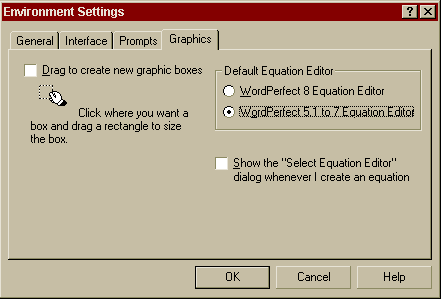
- Special Note to WordPerfect 8 and higher users: Corel WordPerfect 8 and higher includes two equation editors. The WordPerfect 5.1-7 Equation Editor must be used when creating equations. To use the WordPerfect 5.1-7 Equation Editor, click Tools / Settings / Environment / Graphics / WordPerfect 5.1-7 Equation Editor.
(back to Overview)
This shows the status of the documents.
- By looking at this, the author should be able to see if the system has received an Abstract document.
- If the documents were received without any problems, then there will be a link to the Adobe Acrobat PDF file that was created.
- Click on the "View Abstract" button to view the document and ensure there were no errors introduced in conversion.
NOTE: If you have previously submitted a document and would like to resubmit it for any reason, you may press the "Delete Abstract" button. This will 1) notify the system that the documents will be resubmitted and 2) all references to previously submitted documents will be removed. After resetting a document, resubmit the new document through the same web-based upload process. Document Upload/Rules.
You will only have the option to reset a submitted document if it has been received as noted above.
Please be completely sure that you wish to resubmit a document before following this procedure.
(back to Overview)